Booking link
Share one link. Let clients pick the time.
Send it by WhatsApp, email, Messenger, or text. Clients only see the hours you set.
Online booking and a meeting workspace for professionals. Share one link, meet on Google Meet or Zoom, and keep the follow-up in one place.
Your clients book without an account.


Today, upcoming, past, and all. Join the one happening now with one tap.
Explore Meet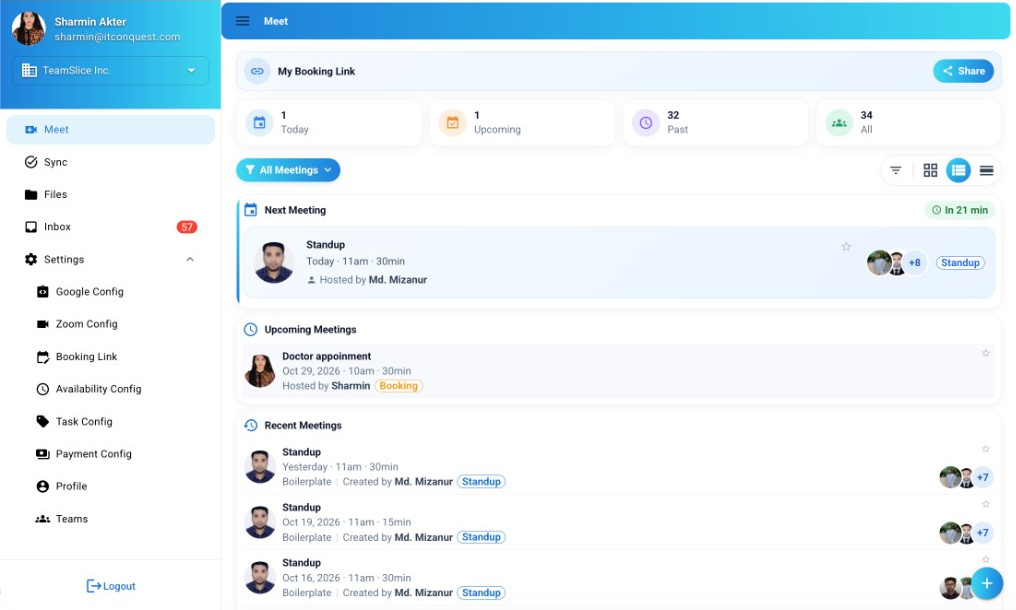
See all of them, the ones you created, or the ones assigned to you.
Explore SyncDocuments from all your appointments. Open the appointment it came from, or download it.
Explore FilesA new booking, a payment to confirm, a comment, a task, or a file. A badge shows what you have not seen yet.
Explore InboxHow an appointment flows
Meet N' Sync handles the work before, during, and after every appointment, so you have more time for the people you meet.
Get startedShare your link. Your client picks an open time, shown in their own time zone.
On a paid appointment, your client sends the payment and enters the transaction ID. You check it and confirm.
Every appointment gets a Google Meet or Zoom link. Topics and files are ready when you join.
Tasks, files, and comments stay on the appointment, and show up where you work.
Booking
Your name, the length of the appointment, and the open times, shown in your client’s own time zone.
When you add an appointment yourself, the day view shows your busy times, so you place it in a free one.
See what is on now and join with one tap. Upcoming and past appointments stay there too.
Date, time, length, the video link, a description, and the topics you will cover.
A read-only page with the time, the topics, and who attended. The person opening it does not need an account.


Inside every appointment
Add an agenda and notes before you meet, so both of you arrive ready.
Attach files to the appointment. They also show up in Files.
Questions and answers stay on the appointment, where everyone can find them later.
Invite guests and see who replied.
Email a summary of the appointment to everyone who attended.
Payments
Add bKash, Nagad, Rocket, Upay, or a bank account, and set the price of your booking link.
Your client sends the payment and enters the transaction ID. They can attach a receipt, or choose to pay later.
The payment shows up in your inbox, waiting for you to check it.
Check the payment and confirm it with one tap. The appointment is marked Paid.
Find a professional
Browse by category, save your favourites, and book with Meet N' Sync.
Tap the heart on a professional to save them here.
Times shown in your local time
Who it’s for
Anyone whose clients book time with them.
Clients book a time from your link, inside the hours you keep.
Doctors · TherapistsFiles shared on an appointment stay with that appointment.
Lawyers · ConsultantsSend one link instead of emailing times back and forth.
Tutors · EngineersEach appointment keeps its own notes and follow-up tasks.
Consultants · EngineersOffer a free first call, or charge for every session.
Tutors · TherapistsAdd the people in your practice, so appointments and tasks stay shared.
Clinics · Law firmsSet up once
All under Settings. Change them anytime.
Integrations
Connect your own Google or Zoom account, and every appointment gets a video link.
Connect your Google account. Accepted invites land on your calendar, and appointments can get a Meet link.
Connect your Zoom account so appointments get a Zoom link and join details.
Appointments still work before you connect either one.
Get started
Every appointment, handled in one place. Share your link, meet your client, and keep next steps moving.